
Currently, I’m working on re-building my database and models. In this series I will take you through the process. The aim is to be as transparent and precise as possible. I will share all my code and all my files for everyone to use. Hopefully, this can be helpful in getting more people into hockey and hockey analytics.
I like to think that one of my biggest strengths is my ability to explain complex matters in an easy-to-understand manner. The goal is to write a series which everyone can follow – Even without any pre-coding experience.
Previous articles in the Series:
Cleaning and Transforming NHL data
In this article, we will learn how to clean and transform data using MySQL. Of course, you could do the data cleaning in Python using Pandas or in a different coding language. However, I’m more comfortable in MySQL and it gives us the advantage of simultaneously building a database.
When this article is over, we will have loaded all NHL data (from 1917 to 2025) and prepared it for xG modelling.
Installing MySQL
Once again, I will refer to @AlexTheAnalyst for the installation guide.
Creating CSV files using DAX Studio and Changing settings in MySQL
If you are brand new to MySQL, I recommend you watch the full video from my channel.
If you already have some experience with SQL, then you just need to watch parts of the video. First we need to download DAX Studio and use it to create CSV files from our Power Query scraper (from 5:30 to 7:45 in the video).
We also need to change the Secure file privileges in MySQL for the script below to work (from 19:09 to 26:40 in the video). Once this is done, we can start running the MySQL code.
Creating the Schema and Tables
The very first thing we need to do is to create our Schema/Database. That’s very easy to do:
https://github.com/HockeySkytte/HockeySkytte/blob/main/NHL_Schema.sql
Next, we will create all the tables required for the script to run. Now this is a little bit backwards, since most of the tables were originally created from Select statements when I wrote the code.
Here we’re defining the tables before we even get started, which normally isn’t something you can do. Anyway, here’s how we create the tables needed:
https://github.com/HockeySkytte/HockeySkytte/blob/main/NHL_Tables.sql
Loading data into the Tables
There are 3 tables in our database that don’t change when we update the data, so we will start by loading data into these 3 tables. It’s the NHL_Teams table, which consists of all teams that has ever played in the NHL, and two BoxID tables which is used to split the ice into smaller zones – Each zone/area has a BoxID.
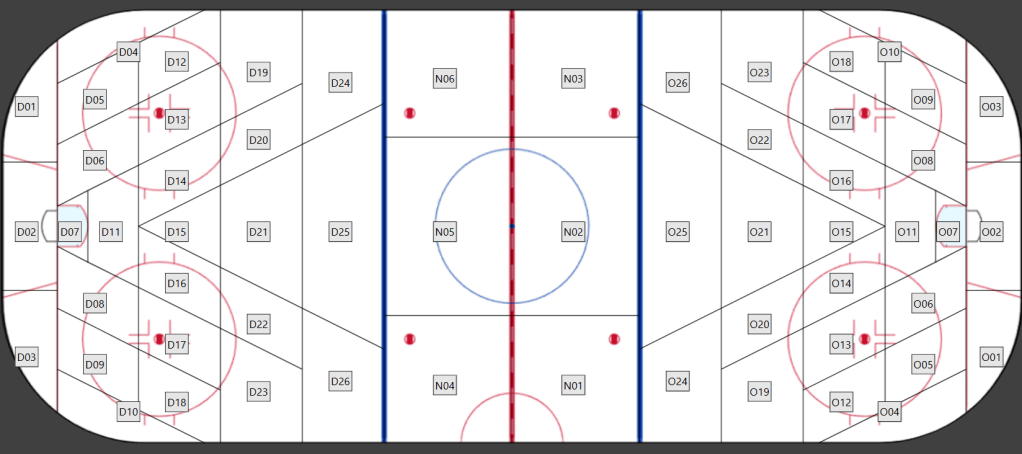
Here’s the CSV files of the 3 tables:
Once you have downloaded the CSV files, you can load the data into our MySQL tables:
https://github.com/HockeySkytte/HockeySkytte/blob/main/NHL_Load_data.sql
Cleaning and Transforming the data season by season
The plan now is to clean and transform the NHL data one season at the time, until we’ve gone through all seasons from 1917/1918 to 2024/2025.
So, here’s the process:
- Use the Power Query Scraper to get data from a specific season (e.g. 20242025)
- Use DAX Studio to create the CSV files (DAX Studio will just overwrite the previous CSV files, so you don’t need to delete or rename the old CSVs)
- Run the MySQL script below
- Repeat the process with a new season selection
This is the MySQL script for cleaning and transforming the data:
https://github.com/HockeySkytte/HockeySkytte/blob/main/NHL_Cleaning_and_Transforming.sql
I hope you were able to understand the code. I tried to provide relevant comments, but the syntax requires some practice to learn.
I have some videos where I go through a similar process step-by-step. However, I’m doing things slightly differently this time. The videos should still be a good learning experience and help you understand the above MySQL code.
Building the NHL database
So, I have built the NHL database by using the Power Query Scraper and running the MySQL script repeatedly for every NHL season. It took a few days of work by the way.
However, I won’t get into details about the data until we have added xG values. You can already download all the EventData (including xG) on the website though (historic data):
https://hockey-statistics.com/data/
Just a heads up – The CSV file is around 3 GB.
Next article – Building xG models in Python
In the next article we will discuss xG modelling and build two models – One that’s based on all unblocked shot attempts (fenwick based) and one that’s based only on shots on net (shot based).
Luckily, it’s relatively easy to build a logistic regression model in Python using Scikit Learn.
Contact
Please reach out if you have comments/questions or if you want to share your own work. I will gladly post it on my platforms.
You can contact me on: hockeystatistics.com@gmail.com
 Hockey-Statistics
4 thoughts on “Hockey Analytics – Cleaning and Transforming NHL data in MySQL”